
Sound and Music
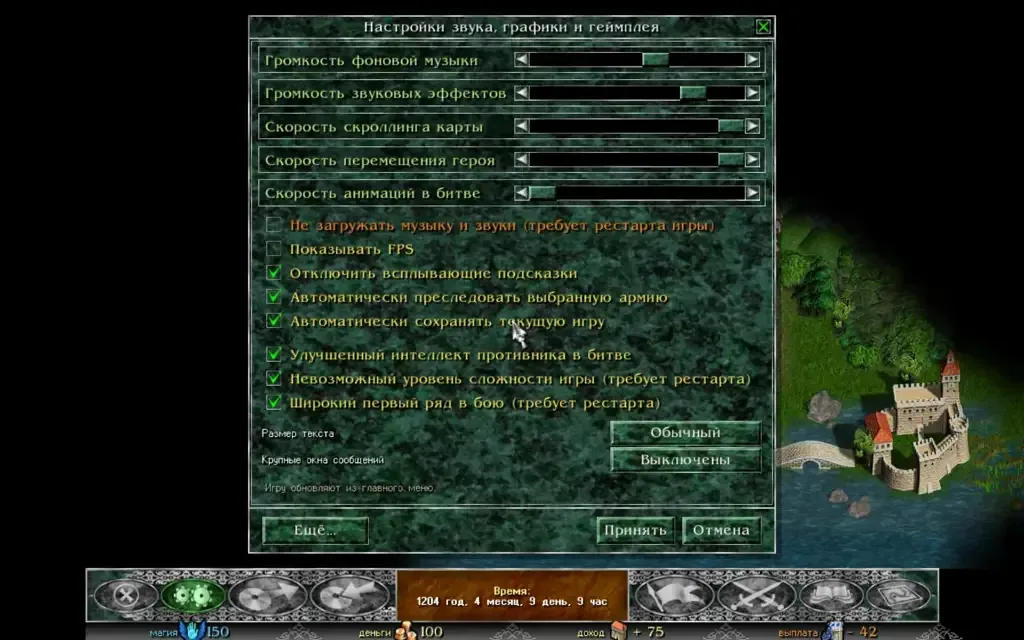
Working with Sound
Section titled “Working with Sound”If the original game is installed on your system, Razdor uses its sound files and music. The engine reads data from the _Sounds.ini file and the Sounds/ folder. Files are not copied into the engine folder. Music in .raw format receives a WAV header when loaded into memory.
Music Themes
Section titled “Music Themes”Music changes depending on the gameplay context:
- Splash screen, scenario and class selection: menu theme.
- Credits: credits theme.
- World Map:
BkgMap2plays upon loading or starting the game. Afterwards, one of seven map themes or the credits theme is selected via a timer. The selection is based on the game’s internal random numbers, which may shift subsequent rolls. - Garrison Battle:
BkgBattle1. - Army Battle:
BkgBattle2. - Victory: a triumphant theme plays from the battle results until the window is closed or the scenario ends.
- Defeat: the defeat theme plays upon the hero’s death.
Sound Effects
Section titled “Sound Effects”The engine plays effects for many events: button presses, opening windows, battle horns, magic strikes, healing, curses, purchasing or using items, receiving gold, moving cards, and other actions. The cannon shot sound triggers for shooters whose attack range is no less than ShotWeaponRange.
Audio Settings
Section titled “Audio Settings”Sound can be controlled in several ways:
- N Key: instantly toggles music on or off (does not work only when entering a save name).
- Esc Menu: the volume of music and sounds is set here (the − and + buttons; for music, the + and − keys). Each sound type can be set to Off or On.
- Configuration File: all volume settings are saved in
audio.jsonwithin your saves folder.
The original had a “Do not load music and sounds” checkbox in its settings (it took effect after a game restart). Razdor has no such checkbox: sound always loads, and you turn it off with the volume.
System Features
Section titled “System Features”- Windows: Razdor follows the default output device. If you change it in Settings → Sound, the sound switches to the new device at once, without a restart; the music starts again.
- Linux: sound works via ALSA.
- macOS: uses Core Audio.
- Build: if you build the engine using the command
cargo build --no-default-features --features gamepad, sound will be disabled.
If you run the Demo (without the installed game), there will be no sound.